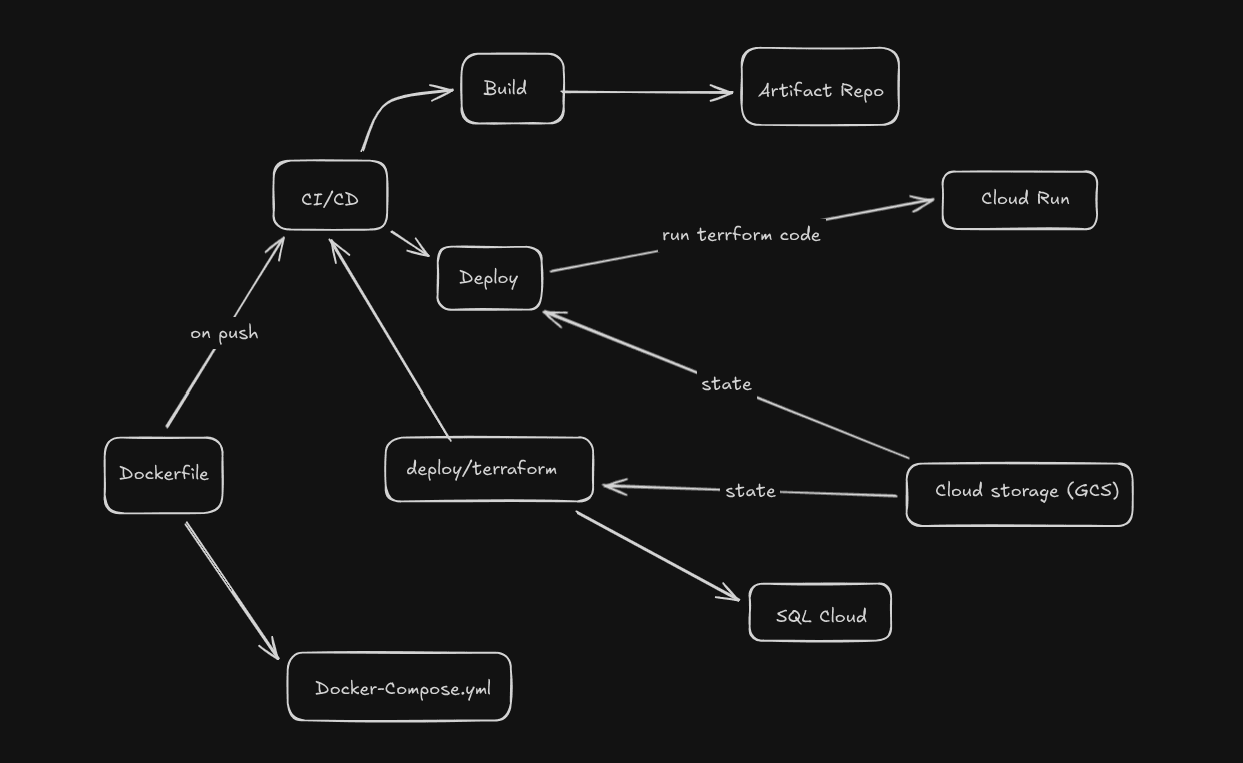
Introduction
In this tutorial we will be going through the steps of setting up a CI/CD pipeline for a monorepo project that contains a backend and frontend application. We will be using Docker, Github actions, Google Cloud Platform (GCP) and Terraform to achieve this. All of the code in this tutorial is available on this github repository. This project is a simple counter application that allows users to increment and decrement a counter value. The backend is built using Express, while the frontend is built using React and Vite and we will be setting up the database using GCP's cloud sql with only one table called counter that will store the counter value, again you can see the code here.
# api/schema.js
const count = pgTable("count", {
  id: serial("id").primaryKey(),
  count: integer("count"),
});
this is the whole folder structure of the project:
├── apps
│   ├── api
│   │   ├── bin
│   │   │   └── www
│   │   ├── db
│   │   │   ├── index.js
│   │   │   └── query.js
│   │   ├── drizzle
│   │   │   ├── ...
│   │   ├── public
│   │   │   └── stylesheets
│   │   │       └── style.css
│   │   ├── routes
│   │   │   ├── count.js
│   │   │   └── index.js
│   │   ├── app.js
│   │   ├── drizzle.config.js
│   │   ├── package.json
│   │   ├── fakeData.js
│   │   └── schema.js
│   └── web
│       ├── public
│       │   ├── ...
│       ├── src
│       │   ├── App.css
│       │   ├── App.tsx
│       │   ├── assets
│       │   │   ├── hero.png
│       │   │   ├── react.svg
│       │   │   └── vite.svg
│       │   ├── hooks
│       │   │   ├── useCount.tsx
│       │   │   └── useCountValue.tsx
│       │   ├── index.css
│       │   └── main.tsx
│       ├── README.md
│       ├── tsconfig.app.json
│       ├── eslint.config.js
│       ├── index.html
│       ├── nginx.conf
│       ├── package.json
│       ├── tsconfig.json
│       ├── tsconfig.node.json
│       └── vite.config.ts
├── deploy
│   └── opentofu
│       ├── artifact_registry.tf
│       ├── cloud_run.tf
│       ├── cloud_sql.tf
│       ├── outputs.tf
│       ├── secret_manager.tf
│       ├── secret_manager_iam_member.tf
│       ├── variables.tf
│       └── versions.tf
├── Dockerfile
├──.env
├──.env.example
├── docker-compose.yml
├── package.json
└── yarn.lock
My Assumption's of the reader
- Basic understanding of CI/CD and github action.
- Basic understanding of docker and docker compose.
- Billable GCP account with a project created.
Table of Contents
- Step 1: Setting up a multi layer docker file
- Step 2: Setting up a docker compose for local development
- Step 3: Setting up google cloud locally
- Step 4: Github actions for CI
- Step 5: Github actions for GCP docker artifacts
- Step 6: Github actions for GCP cloud run
Step 1: setting up a multi layer docker file
In this step we will be setting up a multi layer docker file for our monorepo project. The docker file will have the following layers:
- Base layer: this layer will contain the base image and the necessary dependencies for our project.
- Deps layer: this layer will contain the dependencies for our project.
- Builder layer: this layer will contain the build artifacts for our project.
- Api-runner layer: this layer will contain the necessary files to run the backend application.
- Dev layer: this layer will contain the necessary files to run the backend and frontend application in development mode.
- Web-runner layer: this layer will contain the necessary files to run the frontend application.
  FROM node:22-alpine AS base
  RUN apk update && apk upgrade && \
      apk add --no-cache dumb-init && \
      corepack enable && \
      corepack prepare yarn@4.5.0 --activate && \
      addgroup -g 1001 -S nodejs && adduser -S appuser -u 1001 -G nodejs

  FROM base AS deps
  WORKDIR /app
  COPY .yarnrc.yml package.json yarn.lock ./
  COPY apps ./apps
  RUN yarn install

  FROM base AS builder
  ARG APP_NAME
  WORKDIR /app
  COPY --from=deps /app ./
  RUN yarn workspace ${APP_NAME} run build

  FROM base AS api-runner
  ARG APP_NAME=api
  WORKDIR /app
  COPY --from=builder --chown=appuser:nodejs /app/package.json /app/yarn.lock /app/.yarnrc.yml ./
  COPY --from=builder --chown=appuser:nodejs /app/apps/api ./apps/api
  RUN yarn workspaces focus api --production
  USER appuser
  EXPOSE 3000
  ENTRYPOINT ["dumb-init", "--"]
  CMD ["sh", "-c", "node apps/api/bin/www"]

  FROM nginx:1.27-alpine AS web-runner
  COPY --from=builder /app/apps/web/dist /usr/share/nginx/html
  COPY apps/web/nginx.conf /etc/nginx/conf.d/default.conf
  EXPOSE 80
  CMD ["nginx", "-g", "daemon off;"]

  FROM deps AS dev
  ARG APP_NAME
  ENV APP_NAME=$APP_NAME
  WORKDIR /app/apps/${APP_NAME}
  CMD ["sh", "-c", "cd /app && yarn workspace $APP_NAME dev"]
Step 2: setting up a docker compose for local development
services:
  postgres-db:
    image: postgres:16-alpine
    container_name: express_postgres_db
    environment:
      POSTGRES_USER: ${DB_USERNAME}
      POSTGRES_PASSWORD: ${DB_PASSWORD}
      POSTGRES_DB: ${DB_NAME}
    ports:
      - "${DB_HOST_PORT}:5432"
    volumes:
      - pgdata:/var/lib/postgresql/data
    networks:
      - app-network

  backend:
    build:
      context: .
      dockerfile: Dockerfile
      target: dev
      args:
        APP_NAME: api
    container_name: express_backend
    ports:
      - "3000:3000"
    volumes:
      - .:/app
      - /app/node_modules
    working_dir: /app/apps/api
    environment:
      - NODE_ENV=${NODE_ENV}
      - DB_USERNAME=${DB_USERNAME}
      - DB_PASSWORD=${DB_PASSWORD}
      - DB_NAME=${DB_NAME}
      - DB_PORT=${DB_PORT}
      - DB_HOST=postgres-db
      - CHOKIDAR_USEPOLLING=true
    depends_on:
      - postgres-db
    networks:
      - app-network

  frontend:
    build:
      context: .
      dockerfile: Dockerfile
      target: dev
      args:
        APP_NAME: web
    container_name: react_frontend
    ports:
      - "8080:5173"
    volumes:
      - .:/app
      - /app/node_modules
    working_dir: /app/apps/web
    environment:
      - CHOKIDAR_USEPOLLING=true
      - VITE_API_URL=http://localhost:3000
    depends_on:
      - backend
    networks:
      - app-network

volumes:
  pgdata:
networks:
  app-network:
    driver: bridge
Step 3: Setting up google cloud locally
Use the following instractions to setup google cli locally, google's docs.
Step 4: Github actions for CI
name: CI

on:
  push:
    branches: [main]
  pull_request:
    branches: [main]

jobs:
  ci:
    runs-on: ubuntu-latest
    steps:
      - uses: actions/checkout@v4

      - name: Enable Corepack
        run: corepack enable

      - uses: actions/setup-node@v4
        with:
          node-version: 22
          cache: yarn

      - name: Install dependencies
        run: yarn install --immutable

      # - name: Lint check web and api
      #   run: yarn workspace web lint & yarn workspace api lint
      #
      # - name: Format check web and api
      #   run: yarn workspace api format:check & yarn workspace web format:check

      - name: Build frontend
        run: yarn workspace web build
Step 5: Github actions for gcp docker artifacts
Before continuing with this step we need to make sure we have everything neccessery for this action to work:
- Creating a service-account with the role artifactregistry.writer
- A JSON key for the service account we just created
# command for creating the auth json
gcloud iam service-accounts keys create key.json \
   --iam-account=YOUR_SA@YOUR_PROJECT.iam.gserviceaccount.com
For this command to work make sure you setup google CLI by following Step 3 and make sure to put actual inputs in the place of YOUR_SA@YOUR_PROJECT something like.
- Two GitHub secrets on the repo (Settings → Secrets and variables → Actions):
- GCP_SA_KEY — the full contents of auth key.json
- GCP_PROJECT_ID — your GCP project ID
Okay great! now that everything is setup we can proceed. We will place a actions file inside /.github/workflow/ called docker.yaml next to our main.yaml. It will contain the following (comments are written explaining important statement):
name: Build and Push to Artifact Registry

# This workflow is triggered when the "CI" workflow completes successfully on the main branch.
on:
  workflow_run:
    workflows: ["CI"]
    types: [completed]
    branches: [main]

# defining global envs using variables
env:
  GAR_LOCATION: africa-south1
  PROJECT_ID: ${{ secrets.GCP_PROJECT_ID }}
  REPOSITORY: training
  IMAGE_TAG: ${{ github.event.workflow_run.head_sha }}

jobs:
  build-and-push:
    if: ${{ github.event.workflow_run.conclusion == 'success' }} # only when "CI" is a scuccess.
    runs-on: ubuntu-latest
    permissions: # the permissions required for the job to run.
      contents: read
    steps:
      - name: Checkout repo
        uses: actions/checkout@v4
        with: # checkout the commit that triggered the workflow run, not main.
          ref: ${{ github.event.workflow_run.head_sha }}

        # The credentials_json contians a credentials for a service account with the required permissions to push images to Artifact Registry.
      - name: Authenticate to Google Cloud
        uses: google-github-actions/auth@v2
        with:
          credentials_json: ${{ secrets.GCP_SA_KEY }}

        # This installs/configures the Google Cloud CLI, gcloud
      - name: Set up Cloud SDK
        uses: google-github-actions/setup-gcloud@v2

        # Telling Docker When you interact with Google's Artifact Registry registry, use my Google Cloud credentials.
      - name: Configure Docker for Artifact Registry
        run: gcloud auth configure-docker ${{ env.GAR_LOCATION }}-docker.pkg.dev --quiet

        # Buildx is Docker's more advanced build system: better caching
      - name: Set up Docker Buildx
        uses: docker/setup-buildx-action@v3

      - name: Build and push backend image # build and push the backend image to Artifact Registry
        uses: docker/build-push-action@v6
        with:
          context: .
          file: Dockerfile
          target: api-runner
          build-args: |
            APP_NAME=api
          push: true
          tags:
            | # produce two tags for the image: one with the commit SHA and one with "latest"
            ${{ env.GAR_LOCATION }}-docker.pkg.dev/${{ env.PROJECT_ID }}/${{ env.REPOSITORY }}/backend:${{ env.IMAGE_TAG }}
            ${{ env.GAR_LOCATION }}-docker.pkg.dev/${{ env.PROJECT_ID }}/${{ env.REPOSITORY }}/backend:latest
          cache-from: type=gha # so that the cache can be reused in future builds.
          cache-to: type=gha,mode=max

      - name: Build and push frontend image # build and push the frontend image to Artifact Registry
        uses: docker/build-push-action@v6
        with:
          context: .
          file: Dockerfile
          target: web-runner
          build-args: |
            APP_NAME=web
          push: true
          tags: |
            ${{ env.GAR_LOCATION }}-docker.pkg.dev/${{ env.PROJECT_ID }}/${{ env.REPOSITORY }}/frontend:${{ env.IMAGE_TAG }}
            ${{ env.GAR_LOCATION }}-docker.pkg.dev/${{ env.PROJECT_ID }}/${{ env.REPOSITORY }}/frontend:latest
          cache-from: type=gha
          cache-to: type=gha,mode=max
Step 6: Github actions for gcp cloud run